Online, phone and counter orders on one morning list
Customers pick a collection day in the online store, staff enter phone orders straight into the system, and every morning the daily report shows what to prepare and walks the team through packing one order at a time. All of it runs on CS-Cart, with no commission on sales.
- Pickup date in the store
- Quick counter orders
- Daily report
- Packing station
- Counter tally
- Allergens online and in the shop
- Online store the customer picks a collection day on the product page
- Phone staff enter the order on the Quick order screen
- Counter a customer orders for another day, same screen from the counter app
- Day summary and daily report
- Pickup list and labels
- Packing station
- Counter balance
Piernikomania, Poznań
A Poznań bakery moved from paper slips and a notebook to one order list covering the online store, the phone and the counter. The system has been running there since September 2026, and its first big test is the St. Martin's croissant season.
Read the case studyCustomers choose their own collection day
Every collection date is a separate product variation with its own stock, price and sales history. The number of items available on a given day is simply that variation's stock, for example one hundred croissants per date, and the store stops selling by itself once the pool is gone.
Dates move forward on their own every night. The schedule knows the selling days, the cut-off time, the lead time and the days off, so nobody has to fix the date list on products in the morning.
A schedule instead of manual dates
Selling days, cut-off time, lead time, number of dates shown and pickup hours for every weekday, in every store language.
Seasons that open by themselves
Sales start, last date and fixed dates such as 11 November or Christmas Eve, highlighted on the product page. Variations without a date switch themselves off.
The date is guarded in the cart
The date is frozen when the item goes into the cart. If it changes, the customer sees a notice and cannot place the order until the new day is confirmed.
The date on orders and documents
The actual pickup date is stored with the order, shown in the admin panel and in the customer account, with a filter on the order list and a variable for invoices and packing slips.
Emails at the right moment
Tomorrow's list with a CSV file for the production team, and an optional reminder for the customer the day before pickup, with a calendar entry.
No retyping when the day changes
One button fills in any missing dates without removing anything already in the store.
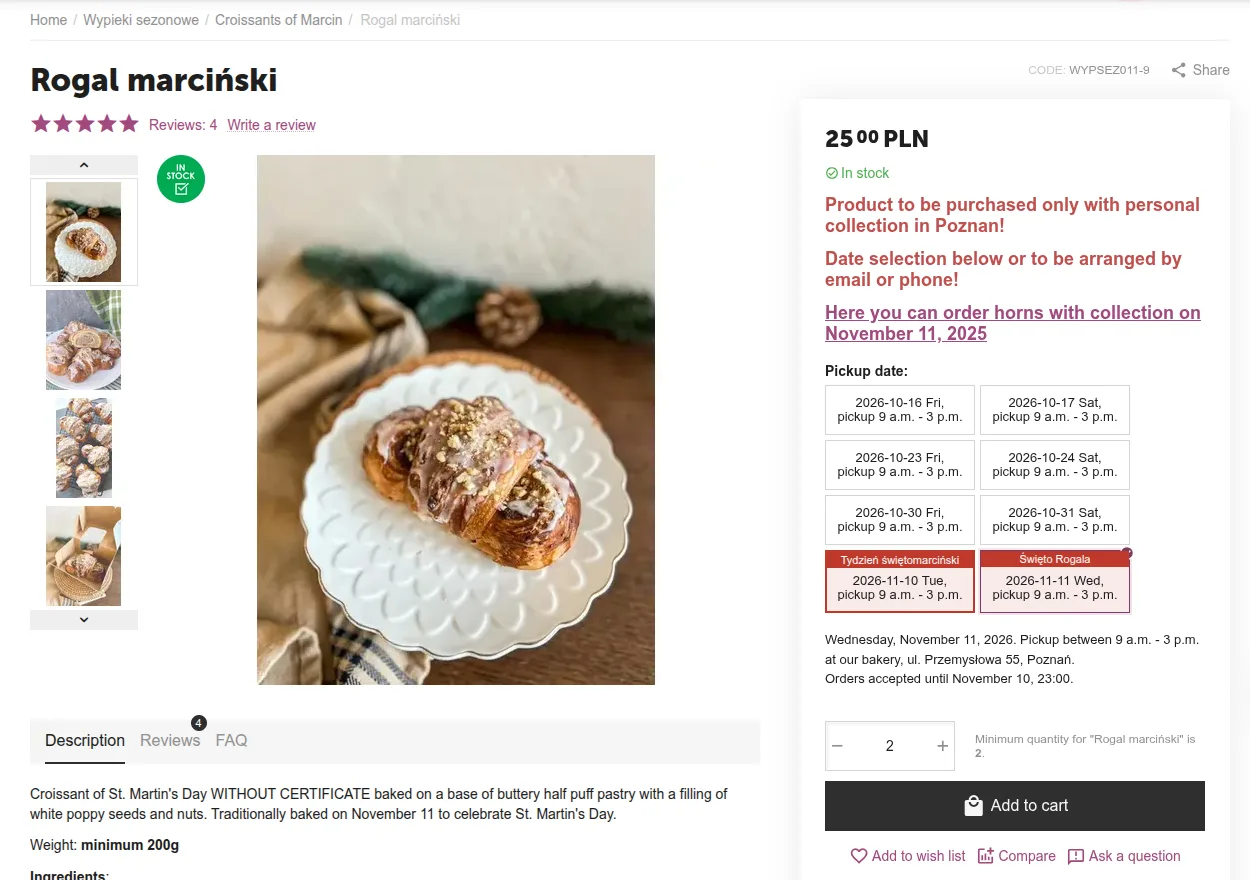
Date tiles on the product page
St. Martin's croissant with collection dates, 11 November selected.
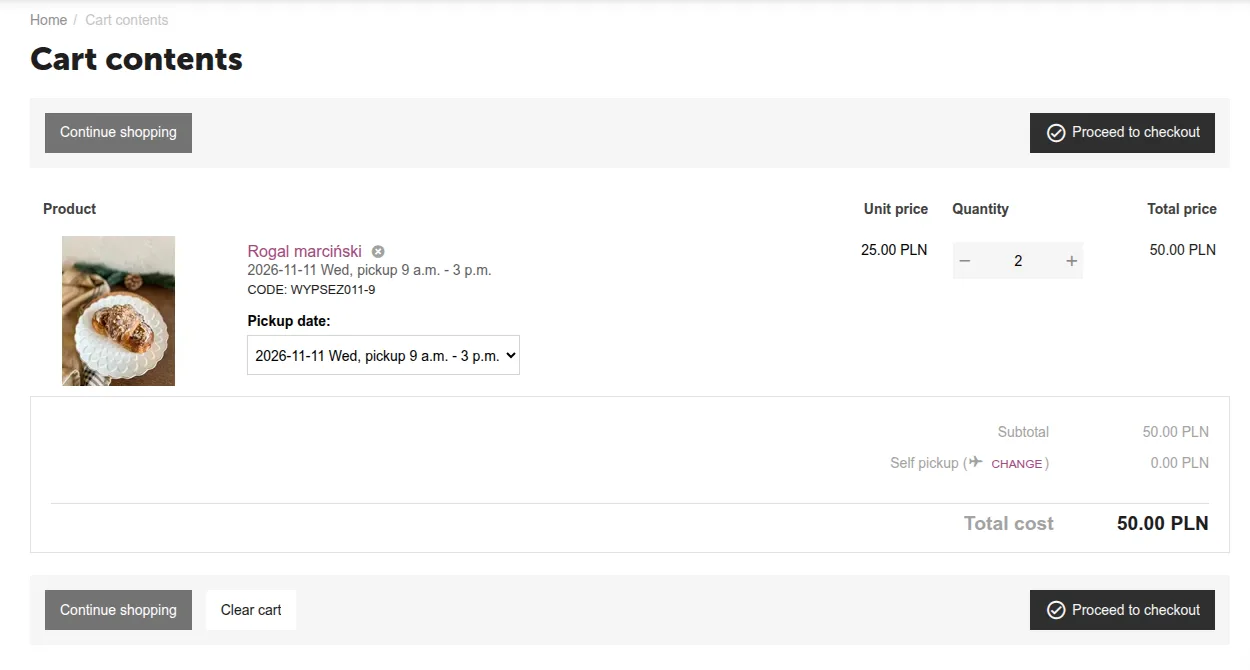
Pickup date in the cart
Every cart item shows the day the customer is ordering it for.
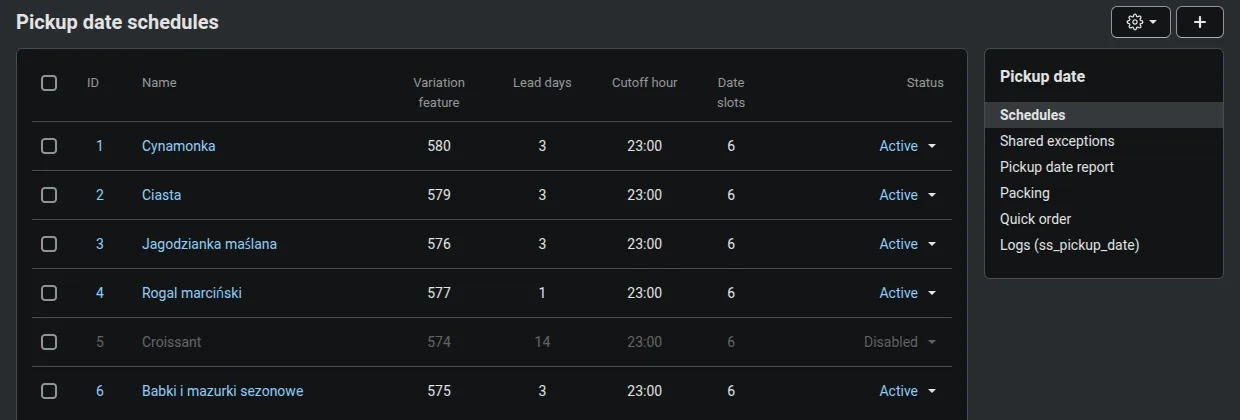
Pickup schedules
A separate schedule for each product group, such as cinnamon rolls, blueberry buns and croissants.
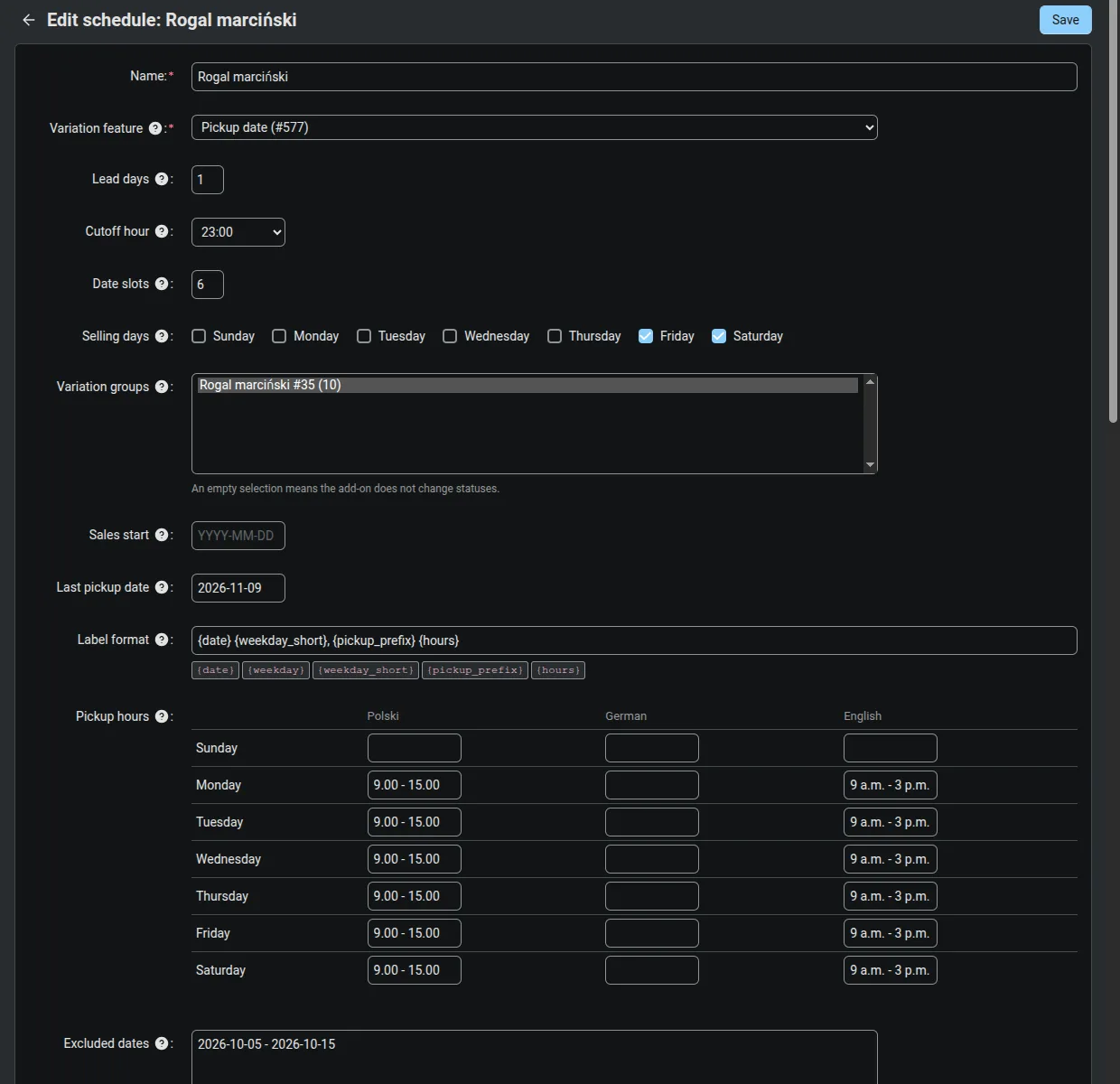
Editing a schedule
Selling days, cut-off time, lead time and the fixed dates of the croissant season.
Phone orders without paper slips
The Quick order screen runs on the staff member's phone. They pick the collection day, type the phone number, and the system suggests the name from that customer's previous order. Products are added from tiles with plus, minus and plus five buttons. After saving, a large order number appears that can be read out to the customer.
The result is an ordinary store order with a pickup date, so it immediately shows up in the day summary, on the pickup list, on the labels and in the packing station. It has its own statuses, Counter order and Collected at counter, which do not change store stock and do not send emails. Staff can take orders for today, or for tomorrow after the cut-off, which the regular cart would not allow.
Next to it runs the Counter Tally, a sales screen for fresh bakes. In the morning staff record how much was baked, during the day one tap on a tile is one item sold, and when something runs out the tally records the sell-out time and the customers who took something else or walked away. At closing it records the leftovers and what happened to them: discounted, Too Good To Go, given away, binned or kept for tomorrow as day-old.
Customers recognised by phone number
The number is normalised, the name is suggested from history, and a warning appears if that number already has an order for the same day.
No duplicate orders
A one-time form token protects against a double tap in a hurry.
A separate permission
The quick order screen can be given to a staff group without access to schedules or store settings.
Lost demand as data
The sell-out time plus the Took another and Walked away buttons show how much could have been sold, not just how much was sold.
Plan and deliberately more
The owner's plan for the day and a flag for days baked deliberately higher, to test whether demand exceeds current output.
Reminders to log
An email in the morning if the bake has not been logged, and after closing if leftovers are missing, only on opening days.
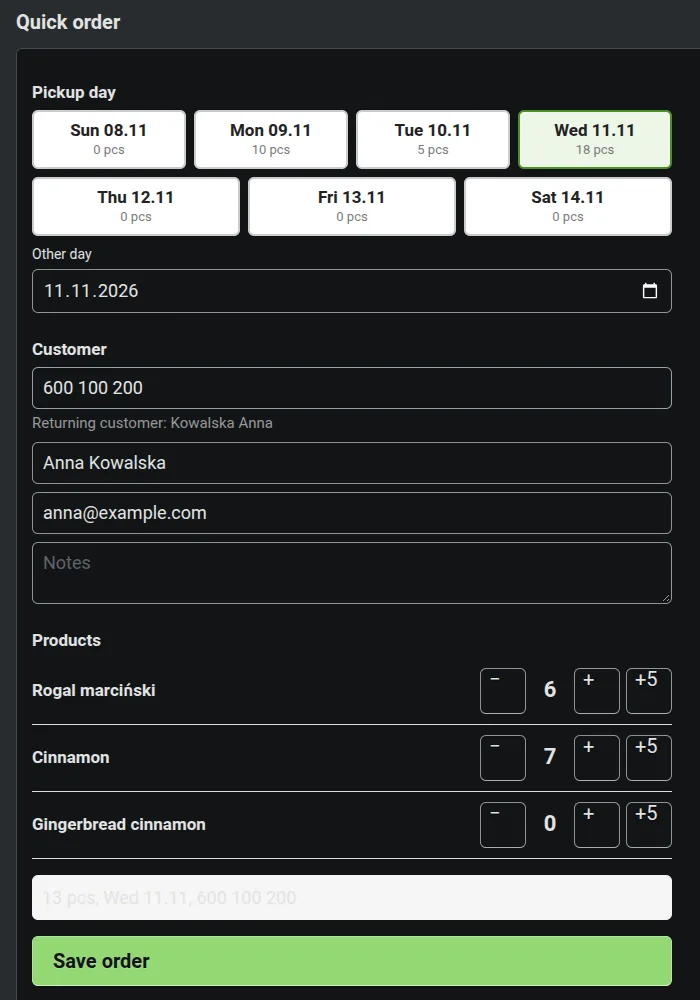
Quick order on a phone
Collection day, customer recognised by phone number, and product tiles.
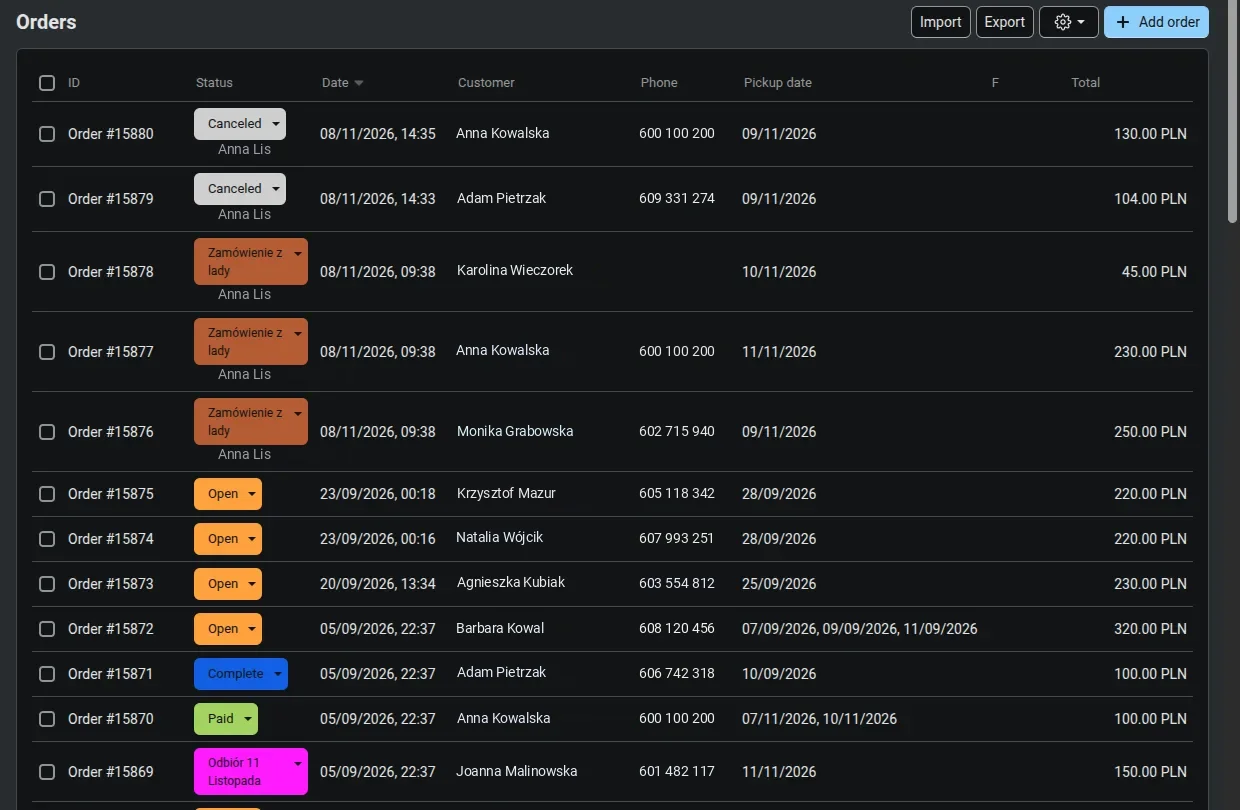
Counter orders on the order list
Phone and counter orders carry their own status and a pickup date, just like store orders.
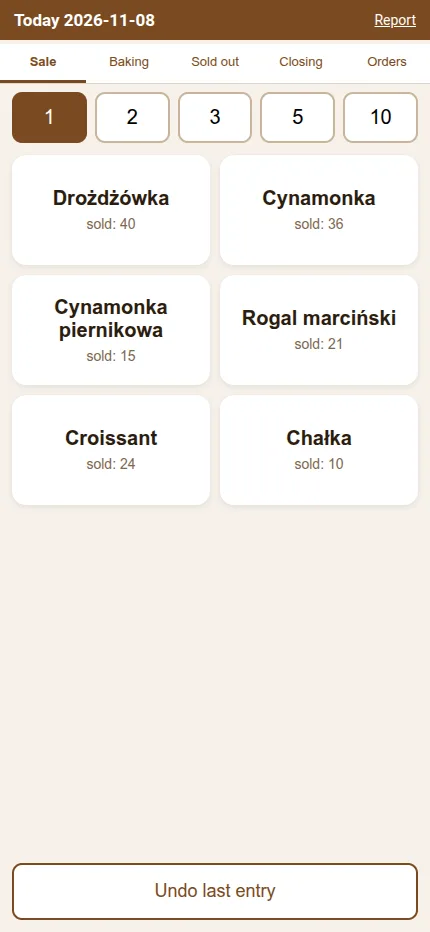
Counter Tally: sales
One tap on a tile is one item sold.
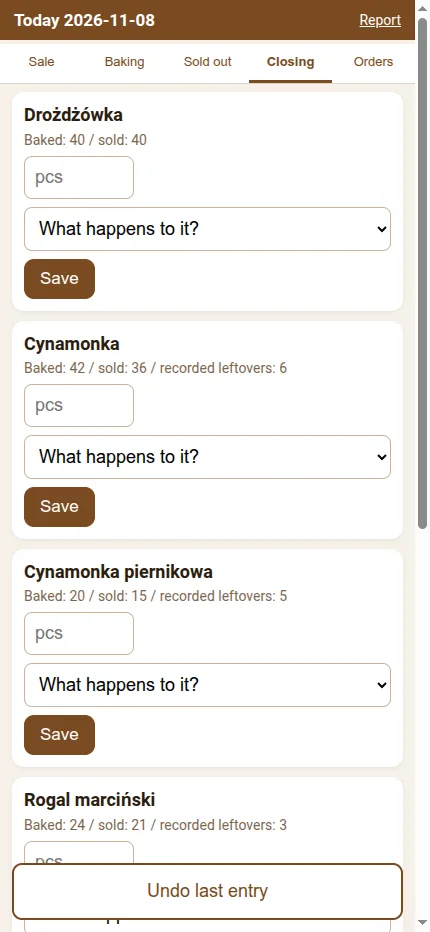
Counter Tally: closing
Leftovers of every bake and what happened to them at closing.
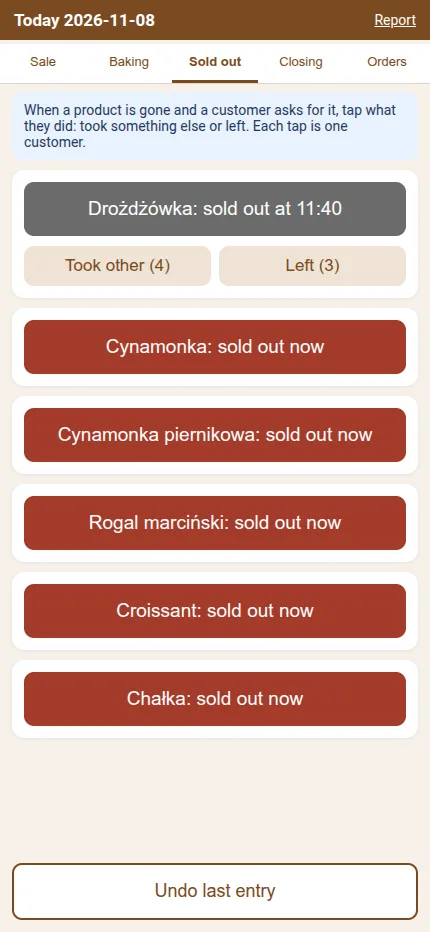
Counter Tally: sold out
Sell-out time and counters for customers who took another bake or walked away.
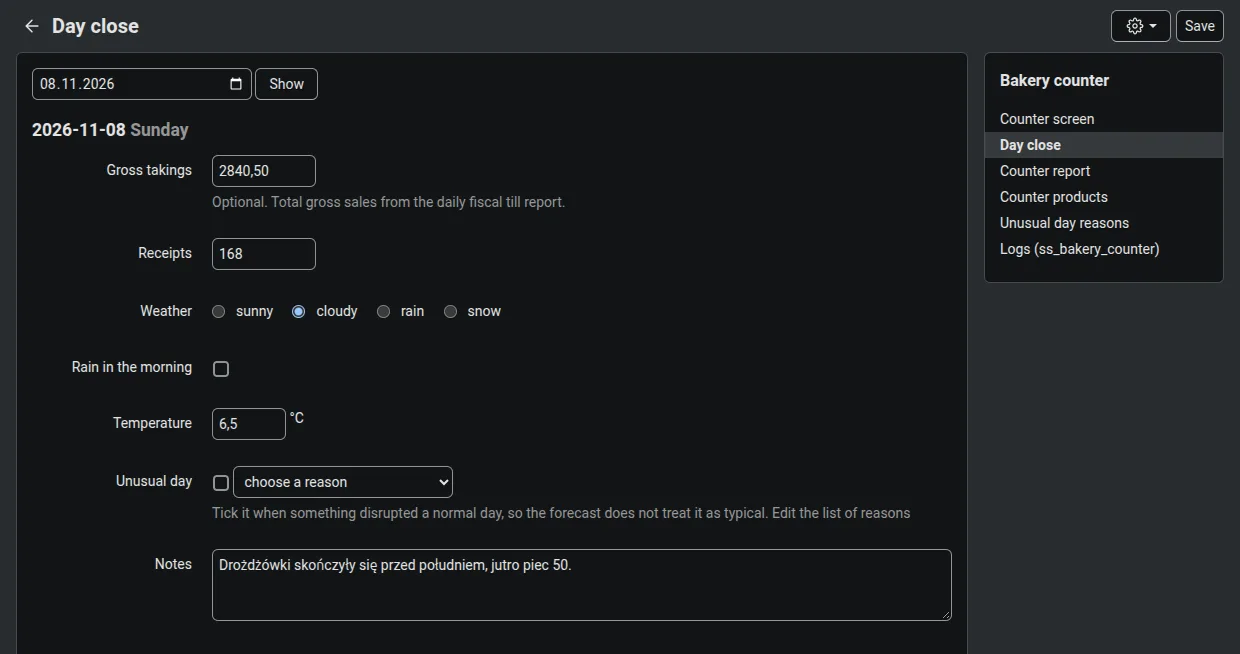
End of day
Takings, receipt count and weather stored together with the counter data.
Every morning you know what to prepare
The day summary shows every collection day on one row with the total number of items, the number of orders and how many are packed. Clicking a day opens the daily report, where products are broken down into every combination of variant and option, such as the doughnut filling or the size of a croissant, each with its own count. It is a production list you can print and put on the table.
The same day can be viewed by order or as a pickup list sorted by surname, with phone, items, total, status and notes. Box labels print on a 2 x 4 sheet, and the data exports to a CSV that opens correctly in Excel. Production staff without access to the admin panel receive tomorrow's list by email.
The Counter Tally adds a report of counter sales: for every day and bake it shows how much was baked, how much was sold, how much was prepaid online, when it ran out and how much was left. A completeness balance shows how many minutes before closing the stock ran out, and the daily summary sets takings against the weather and holidays.
Day summary
Items, orders and packed counts for every day, with date and schedule filters and a Pack button.
Daily report with combinations
Every variant and option with its own count, and the day broken down by order underneath.
Pickup list
Sorted by surname, with a Packed column and bulk marking of orders as collected.
Date range view
Products in rows, days in columns, up to 31 days at once, useful before a busy season.
Print, labels and CSV
A4 production list, pickup list, 2 x 4 labels with name, number and items, and packing slips for the whole day.
Counter report
Baked, sold, prepaid, sell-out time and leftovers, in one place together with store orders.
- 1 Night Dates move forward and tomorrow's list is emailed to production
- 2 Morning Daily report and bake log what to prepare for orders, what was baked for the counter
- 3 During the day Sales and new orders counter taps, phone orders, sell-out times
- 4 Before pickups Packing and handover packing station, then the pickup list by surname
- 5 Closing Leftovers and summary what happened to leftovers, weather, counter report
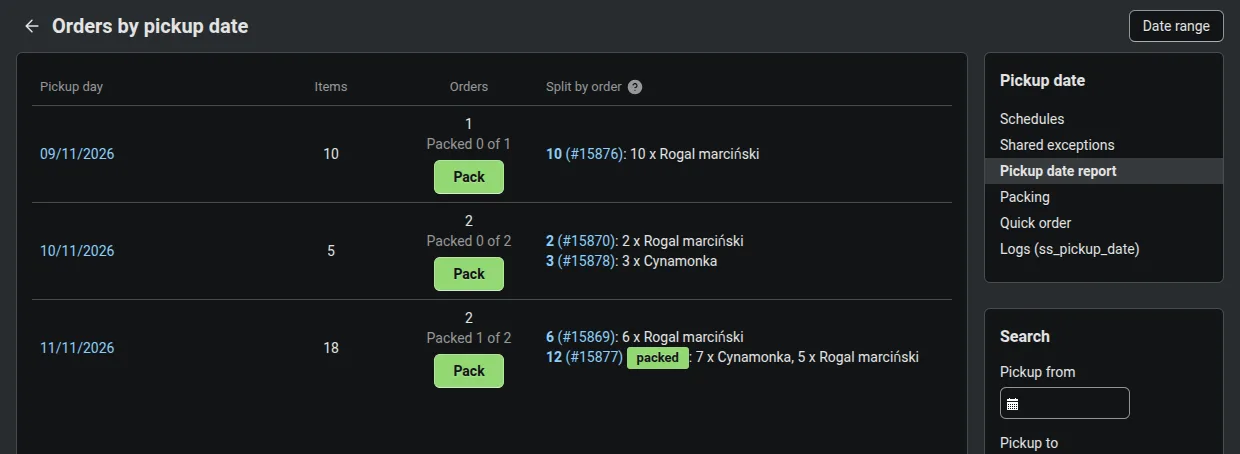
Day summary
Collection days with item totals, order counts, packed counts and a Pack button.
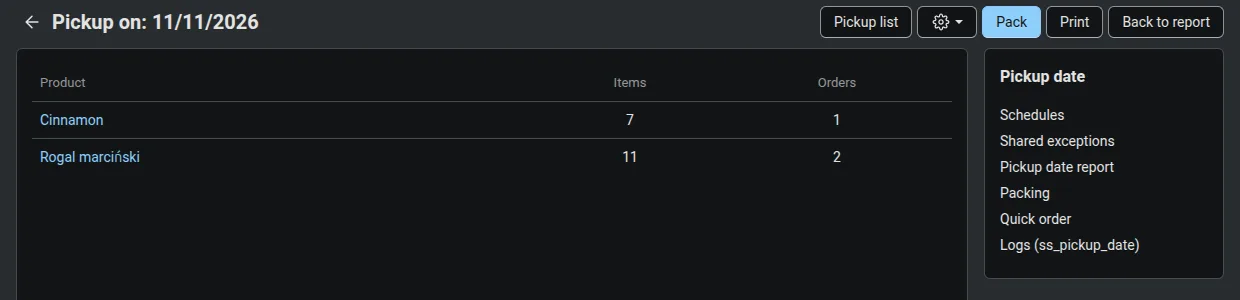
Daily report
Production list for 11 November: products and the number of items to prepare.
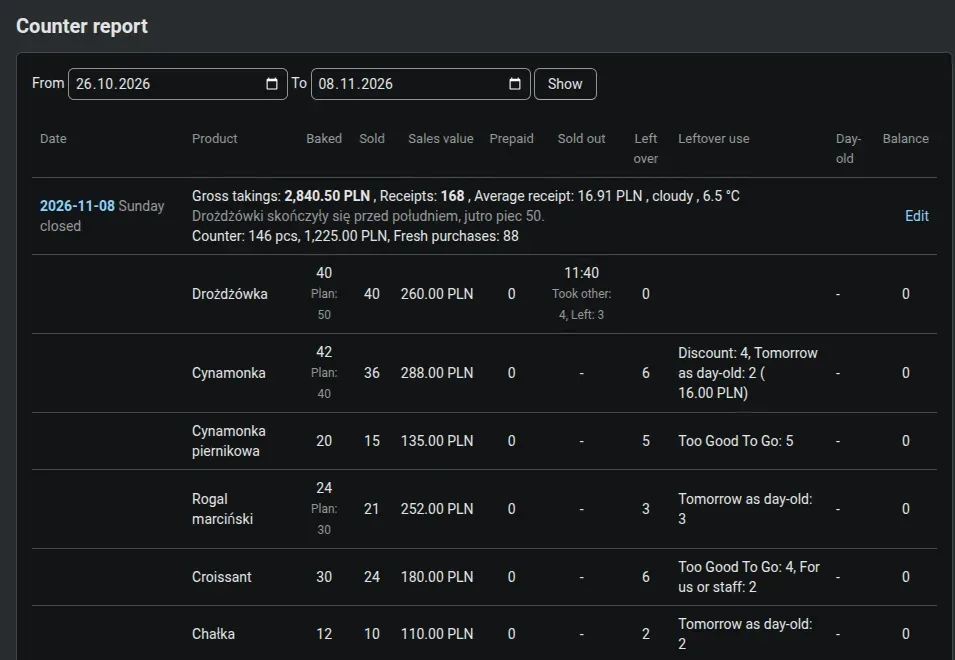
Counter report
For every bake: plan, baked, sold, sell-out time and what happened to leftovers.
One order at a time, nothing left to memory
The Packing menu item opens the nearest day that still has something to pack. The person at the packing table sees a single order: number, customer, phone, payment, notes and that day's items with variant and options, each with a large checkbox. The Packed, next button only works once every item is ticked.
Orders come in order of their number. One that cannot be packed yet can be moved to the end of the queue, and a mistake can be undone with one button. The card prints the label and packing slip for that order, and the system warns when the order also has items for other days. The screen uses large buttons and type so it works comfortably on a tablet.
The packed flag does not change the order status, does not send emails and does not touch stock. The day list shows how many orders are ready, and at handover the pickup list shows a Packed column next to the customer's name.
- 1 Packing menu the nearest day with something to pack
- 2 Order card the day's items with variant and options
- 3 Ticking items off the button stays locked until all are ticked, with Postpone and Undo
- 4 Packed, next label and packing slip, then the next order
- 5 Handover pickup list with the Packed column, marked as collected
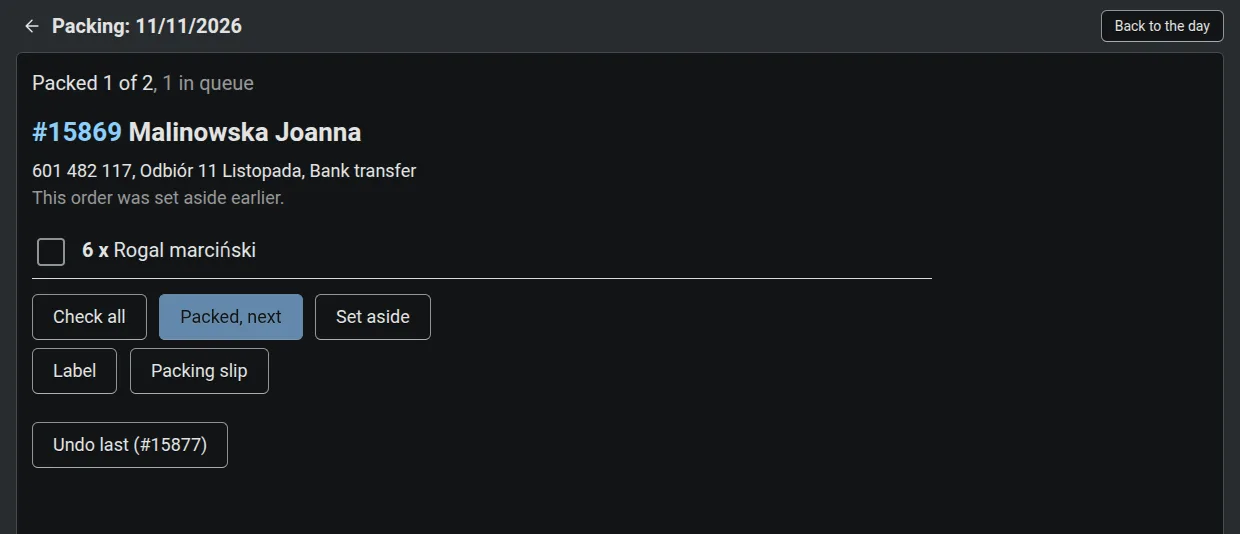
Packing station
One order at a time, each item with a large checkbox.
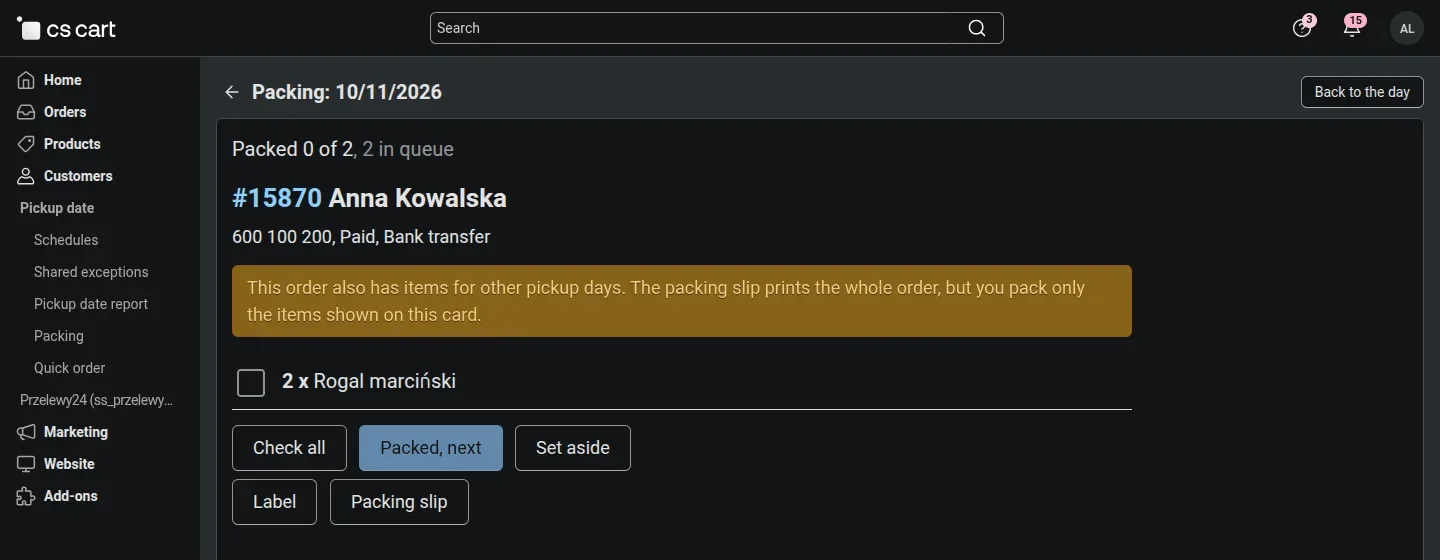
Warning about other days
The packer sees that the order also has items for another date.
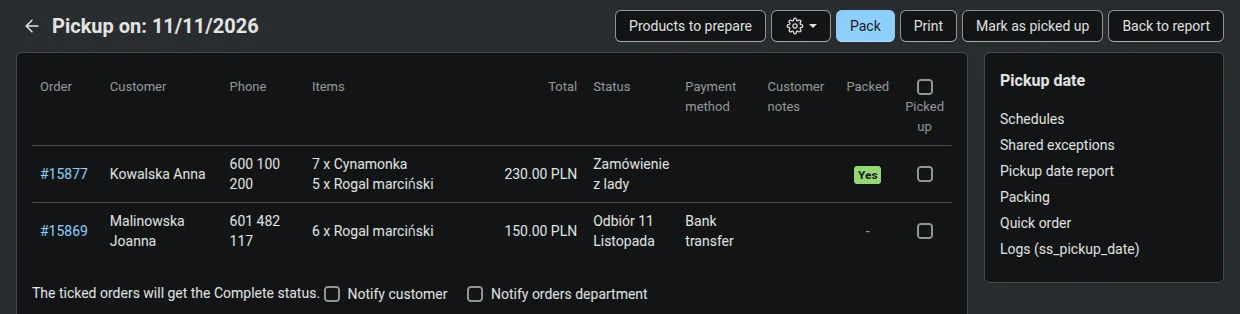
Pickup list
The day's orders by surname with a Packed column, ready for handover.
Allergens prepared once, shown online and at the counter
Food information rules require that a customer buying at a distance knows the allergens before placing an order, and that a customer in the shop can check them without asking about every product. The module gathers this information on one admin screen: products in rows and the fourteen allergens of Annex II to Regulation (EU) No 1169/2011 in columns. The first click in a cell means the product contains the allergen, the second that it may contain it, for example when the same kitchen also makes products with nuts. Separate columns mark products with no allergens and those the information does not apply to, such as a gift voucher or packaging.
You do not have to start from an empty table. The module reads the ingredients section of the product description and proposes allergens recognised from Polish ingredient names such as wheat flour, butter, eggs or hazelnuts. For supplier ingredients whose composition varies, such as chocolate, sprinkles or gingerbread spice, a note reminds you to check the label. A proposal does not reach the store until someone has checked and approved it, and if the ingredients in the description change after approval, the product is flagged for another check.
Approved information appears on the product page, below the price and the add to cart button, split into allergens and what the product may contain. The same screen prints an A4 allergen sheet for the shop with an alphabetical list of products, for the whole range or a single category. The store is responsible for the content: the module makes it easier to prepare and display, and customers only see what has been knowingly approved.
The whole range on one screen
Filters by name, category, status and data state: no data, proposal, approved or changed ingredients. Variations use the data of the parent product.
A proposal from the ingredients
Allergens read from the description, including blocks embedded in it. A sentence starting with may contain goes to traces, and a proposal never overwrites saved or approved data.
Nothing without approval
Drafts for work spread over several days and approval of selected rows. Until a change is approved again, the store keeps showing the previous version.
One set for many products
Allergens set on one product can be copied to selected products, such as a whole category, and adjusted before saving.
Comfortable on a phone
The table turns into cards with large allergen buttons, and saving and approval stay at the top of the screen.
Staff permissions
Viewing, drafts, proposals, approval and printing the sheet are granted separately, so counter staff can print the sheet without being able to approve.
- 1 Ingredients in the description the recipe kept with the product
- 2 Proposal allergens from the ingredients, notes on supplier ingredients
- 3 Review corrections in the table or on a phone, saved as a draft
- 4 Approval only now does the information reach the store
- 5 Product page and sheet allergens before purchase and an A4 sheet at the counter
From counter records to a baking plan
The hardest decision in a bakery is made in the morning: how much to bake. The till does not help, because it only shows what was sold. A day when the sweet buns ran out at eleven looks like a slow day at the till, and a forecast built on such data underestimates demand week after week.
That is why the counter tally records, from day one, what the till cannot see. Once the bakery has about six weeks of complete records, that history is enough to work out how much of each bake to make for the next day.
What the tally records today
Bakes and sales
The morning entry, extra batches and sales with a tap on a tile, separately for buns, cinnamon rolls or blueberry buns that the till lumps together.
Sell-out time
The report shows how many minutes before closing an item ran out, which tells how far demand outran the bake.
Lost demand
The Took other and Walked away buttons count customers who bought something else after a sell-out or left without buying.
Leftovers and where they went
Marked down with a price, a Too Good To Go bag, given away, binned, staff, or kept for tomorrow as day-old.
Plan and test days
The Plan field records the owner's own estimate, and the Deliberate extra flag marks a day baked above the usual to test real demand.
Unusual days and weather
A broken oven, a city event or morning rain are flagged, so such a day is not later taken as a pattern.
Bake forecast for the coming days
A number of items for each bake for tomorrow and the rest of the week. It starts from demand on the same weekday over recent weeks, reconstructed where the item sold out: from the sell-out time and from customers who took something else or walked away. Unusual days are left out of the history. The quantity is matched to the item price and cost, so that running short and baking too much cost as little as possible, and orders already placed for that day from the store, the phone and the counter go on top. The number sits next to the Plan field with a short note on where it came from, so the owner sees whether the system beats her own estimate and still decides how much to bake. The forecast for later days is used to order ingredients and plan deliveries.
We are rolling the forecast out at Piernikomania right now. The first forecast for a bake appears once the tally holds at least four records of the same weekday from the last ten weeks. Until then, the system shows how many such days are still missing.
What makes this system different
We built it at a real counter, in season, together with the bakery's owner.
One list from every channel
The store, the phone and the counter feed the same orders, so the daily report, labels and packing cover everything, with no paper slips.
You also see what ran out
The tally records the sell-out time and customers who walked away, so a day with an empty counter at eleven no longer passes for a slow day.
Limits come from the product
Each date has its own stock, so there is no need for a separate listing per day or for watching sales by hand.
The whole path in one store
From choosing the day through the production list and packing to handover, without moving data between programs.
A phone instead of a terminal
The counter screen and quick orders run in the phone's browser and the packing station on a tablet, with no app to install.
No commission on sales
A fixed subscription instead of a percentage of every order. Customer data stays in your own store.
How the rollout works
- 1
A talk about your products
We go through what you sell for collection, your selling days, cut-off times and seasons, and how you take phone orders today.
- 2
Setup on a test copy
Schedules, dated variations, the daily report, packing and the counter screen are set up first on a copy of your store so you can check everything.
- 3
Team training
We walk counter staff through the counter screen and quick orders, and the packer through the packing station, using your own products.
- 4
The first season together
We stay with you through the first busy period, when orders pile up and every adjustment counts straight away.
Subscription
A one-off rollout fee and a fixed monthly subscription. No commission on orders and no charges per item sold.
299 PLN per month
Prices exclude VAT. One-off rollout fee 990 PLN, minimum term 12 months.
- the Pickup Date and Counter Tally add-ons with ongoing updates
- setup of up to 3 pickup schedules and up to 15 dated products
- daily report, labels, packing station and the Quick order screen
- team training on your own products
- support through the first season
- A larger range or extra changes are quoted separately. Prefer to buy the add-ons outright? We will prepare an individual quote.
- The system runs as add-ons to a CS-Cart store. If your store is on another platform, we can build a new one or migrate the existing one.
Frequently asked questions
Do I need a CS-Cart store?
Yes, the system consists of CS-Cart add-ons. Pickup Date works from version 4.10.1, and the Counter Tally and Allergens from 4.14.1. If your store runs on another platform, or you do not have one yet, we can set it up as part of the rollout.
Does the system tell me how much to bake?
The daily report tells you how many items to prepare for store, phone and counter orders. You still decide how much to bake for walk-in sales, but the tally shows when stock ran out and how much was left, so you can see where the plan was too low or too high. These records feed the bake forecast for tomorrow and the following days, which we are adding to the system right now.
Do counter orders change store stock?
No. They have their own statuses that leave stock untouched and send no emails, so an order taken by phone does not use up items available in the online store.
Do I need special hardware?
No. The counter screen and quick orders run in a phone browser, and the packing station is most comfortable on a tablet. Labels print on an ordinary printer on 2 x 4 sheets.
Does it replace the till?
No. Counter sales still go through your till. The Counter Tally works alongside it and records what the till does not show: sales per bake, sell-outs and leftovers.
Is the allergen module responsible for the information being correct?
No. The module suggests allergens from the ingredients in the description, makes them easier to check and shows them in the store and on the shop sheet, but the seller is responsible for the content. Customers only see what has been approved, and for supplier ingredients it is worth checking their label before approving.
Does it work with Multi-Vendor?
The add-ons install on both CS-Cart and Multi-Vendor, but the Piernikomania rollout was done on CS-Cart. For a marketplace we test the setup on a copy before going live.
Let's talk about your bakery
Tell us what you sell for collection and how you take orders today. We will reply with what your day could look like in this system.
office@soft-solid.net · +48 661 661 964
SoftSolid · ul. Sportowa 14, 62-090 Rokietnica
NIP PL8421361047