All your company knowledge,
ready to talk to
The AI assistant learns from your documents, procedures and knowledge base, then answers your team's questions in natural language. It runs in the cloud or entirely on your own servers, where no data ever leaves the company.
- Access control, every employee sees only what they are allowed to
- A fully on-premise option, your data never leaves the organisation
- Enterprise-grade security, GDPR compliant
How it works
From your documents to ready answers in three steps.
You upload your company knowledge
PDF and DOCX documents, pages, FAQs and procedures. The system splits the content into fragments and builds a searchable base from it on its own, with no manual tagging.
The AI organises and understands it
Every fragment is turned into a representation the model can search by meaning, not just by exact keywords.
Your team asks and gets answers
An employee types a question in natural language. The assistant finds the right fragments, builds an answer based only on your data and points to the source.
What the assistant can do
Everything your team needs to reach company knowledge fast.
Knowledge from your documents
It reads PDF, DOCX and text files, including scanned documents with no text layer, and splits them along their own chapters rather than blindly every few hundred characters.
Access control
Each employee sees only the knowledge they are allowed to. Roles and groups are respected in the answers.
Internal chat for your team
A separate channel for employees, isolated from the customer chat, with its own scope of knowledge.
Answers with a source
The assistant relies solely on your knowledge and shows where the answer comes from. It does not make things up.
Natural conversation, many languages
It understands freely asked questions and remembers the thread. It replies in the language of the person asking, down to their regional variety, instead of switching to the literary standard.
A panel and full control
You manage the knowledge, review conversation history with answer ratings, track the use of your request package and set data retention.
It learns from its own gaps
Unanswered questions gather in the panel, grouped into topics, and the assistant drafts the content you only need to edit.
Articles with a version history
You write your own articles in the panel, and every change stores the previous version, so a bad edit takes one click to undo.
Running an online store as well? The assistant knows your products, reviews and order statuses, answers customers right on your site and helps them buy. The details are further down, in the section on the store chat.
Knowledge that watches its own gaps
The loop in which every unanswered question becomes material for the assistant.
A knowledge base usually ages in silence, because nobody knows what is missing from it. Our assistant shows its own gaps and helps you close them, so the longer it works, the more it knows.
You see what people ask and what you are missing
Every question the assistant had no material for lands on a list of gaps in the panel. The list groups questions by topic rather than by wording, so five ways of asking about returns share one row with a counter instead of scattering into five entries.
You write one article instead of five answers
You select the variants of the same problem and the assistant drafts the content from the knowledge you already have. You edit it your way and save it as a knowledge page. If a similar article already exists you get a warning before saving, and a single button checks whether the new text contradicts what the base already holds.
The assistant knows the article is yours
The page enters the base as your own material and is treated differently from an uploaded vendor document. When the match is comparable the assistant reaches for it first, and it takes prices and availability from live data rather than from the text of the article.
The knowledge does not age in silence
Every page watches the part of your offer it describes and reports itself for review when that material changes or when too much time has passed since the last check. The version history keeps previous states along with the date and the person, shows line by line what a restore would change, and going back to earlier content takes a single click.
An assistant that helps you sell
The store chat answers, shows the goods and leads the customer to the cart.
In an online store the assistant does not stop at an answer. It shows a product with its current price, checks an order and lets the customer put an item in the cart without leaving the conversation, while the panel shows how much those conversations brought in. Each of the features below is switched on separately in the add-on settings.
Product cards with the current price
A recommended product appears as a card with a thumbnail, the price, availability and a button to the product page. The card reads price and stock from the store the moment it is shown, so a morning sale is visible straight away.
The cart straight from the conversation
On a product card the customer clicks Add to cart or Add to wishlist, and an order card offers Order again. The store itself performs the action in the customer's session, and the assistant never does anything on the customer's behalf.
The order and the parcel on one card
A question about an order ends with a card showing the status, the date it was placed and each shipment with its tracking number. The card only shows an order the customer is entitled to see in that conversation.
Answers from the store as it is right now
The assistant searches the catalogue by category, price range and availability, and knows the payment and delivery methods switched on right now and the promotions that are running. It looks up a product code exactly, and relates a question asked on a product page to that product.
No empty box to start with
The most common questions sit under the greeting, and the answer to one can come instantly from the FAQ without using a request from the package. Suggestions for the next question appear under an answer, and the customer can also dictate a question by voice.
A tone that suits your store
Short answers of about two sentences work well on a phone, emoji can be switched on in a gift shop, and your own guidance on style is added in the settings without waiting for a new release.
You know whether the chat pays for itself
The panel shows how many conversations ended in a purchase and what those orders were worth. We count conservatively, only purchases made during the same visit as the conversation, so the figure holds up when questioned.
Customers rate the answers
Every answer carries two rating buttons. Answers marked as unhelpful can be filtered in the conversation history and are listed in the periodic email report next to the unanswered questions.
See what it looks like in the panel
Four screens from everyday work with the assistant. The complete set, together with the configuration and conversation history, is on a separate page.
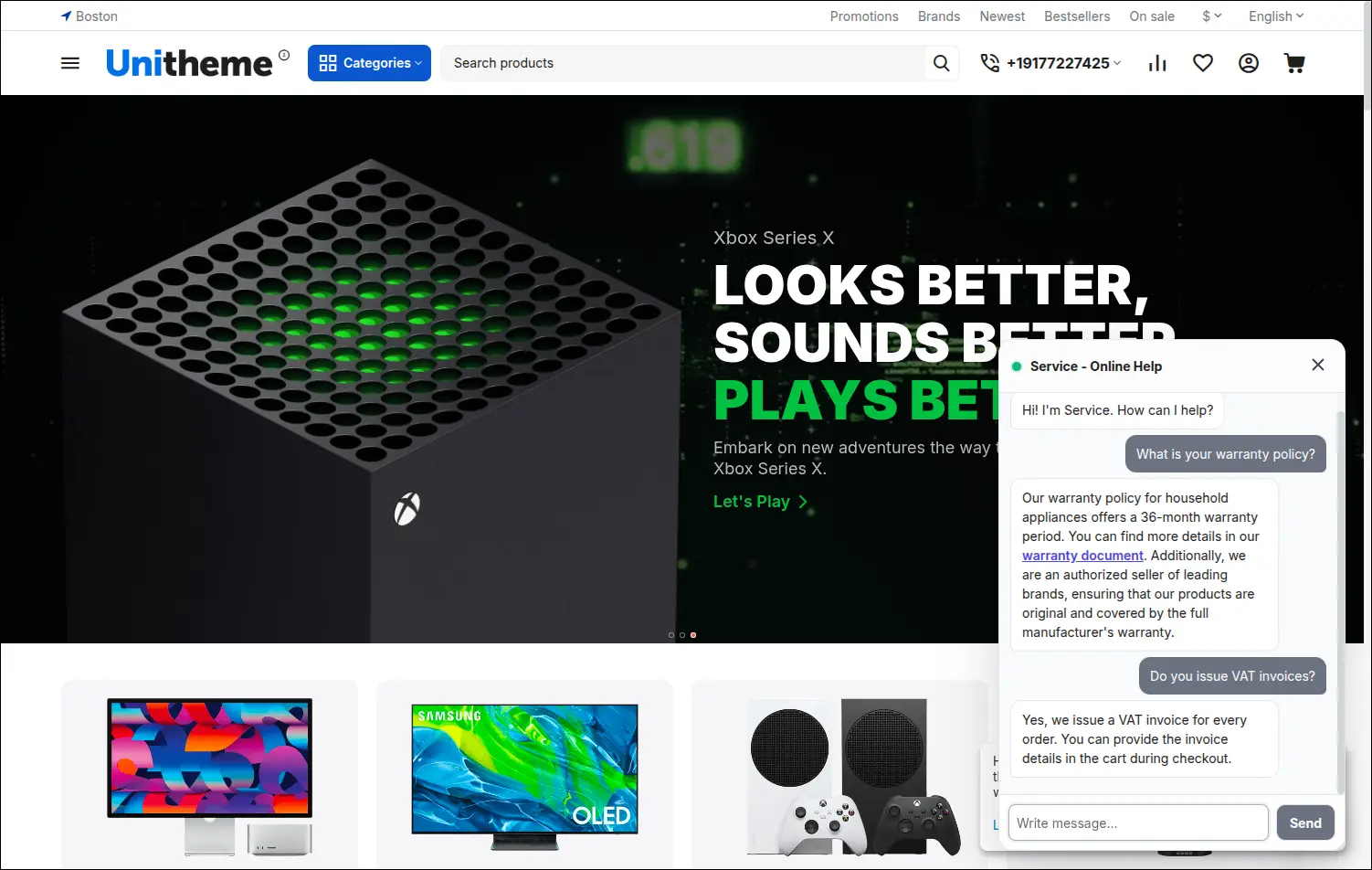
The chat widget in the store
This is how the assistant looks to a customer: a chat window in the corner of the page, a question asked in their own words and a specific answer built on the store's knowledge.
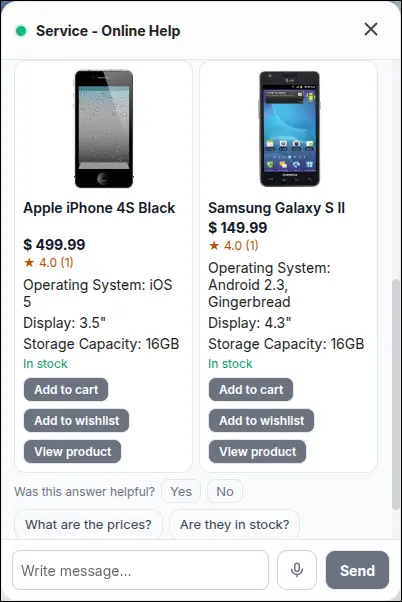
Cards with cart buttons
Several products side by side for comparison, with ratings, features and the Add to cart and Add to wishlist buttons. The store performs the action in the customer's session.
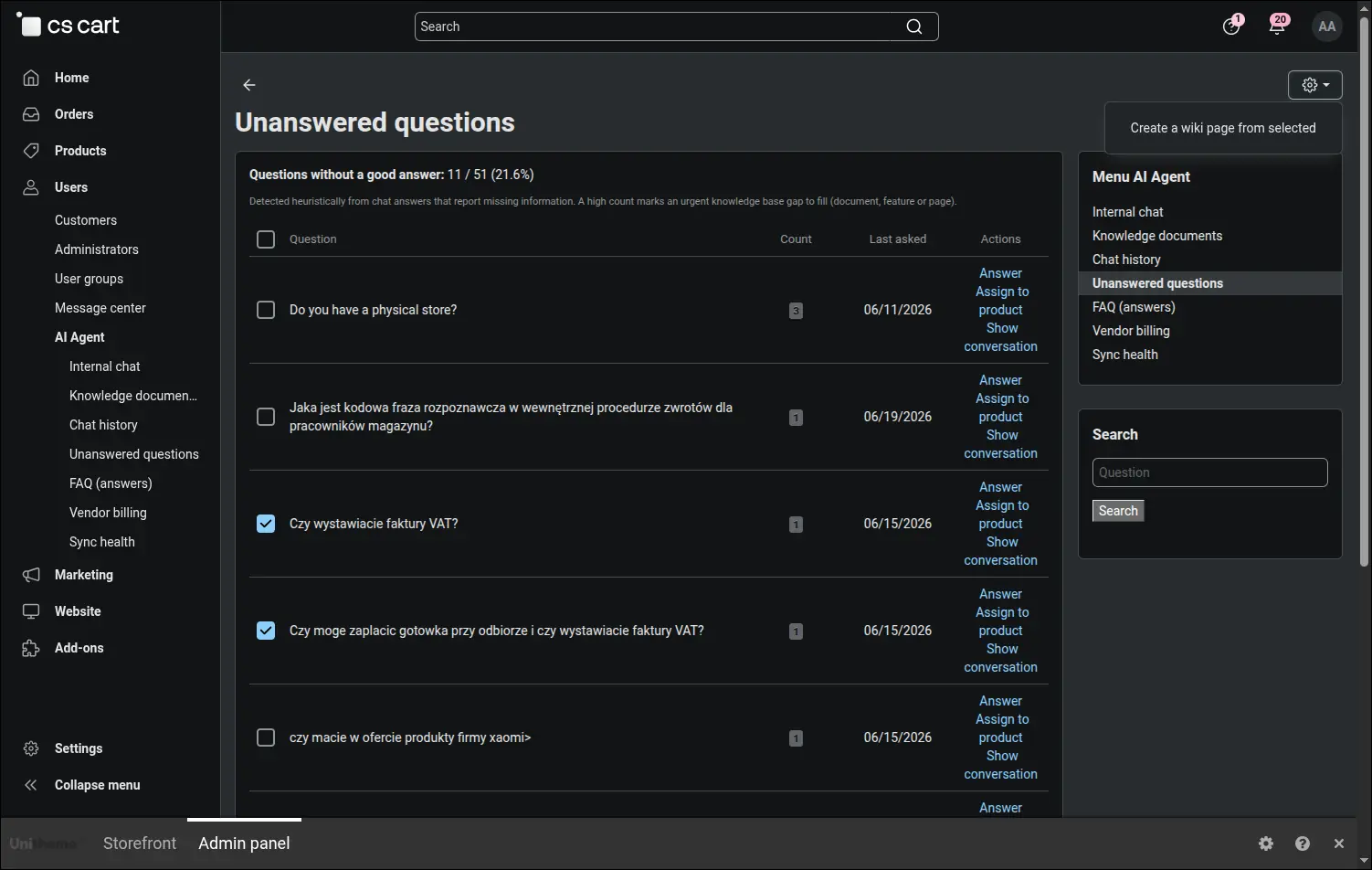
Unanswered questions
A list of knowledge gaps with a repetition counter and a share of total traffic. The starting point of the loop in which the assistant learns from what it did not know.
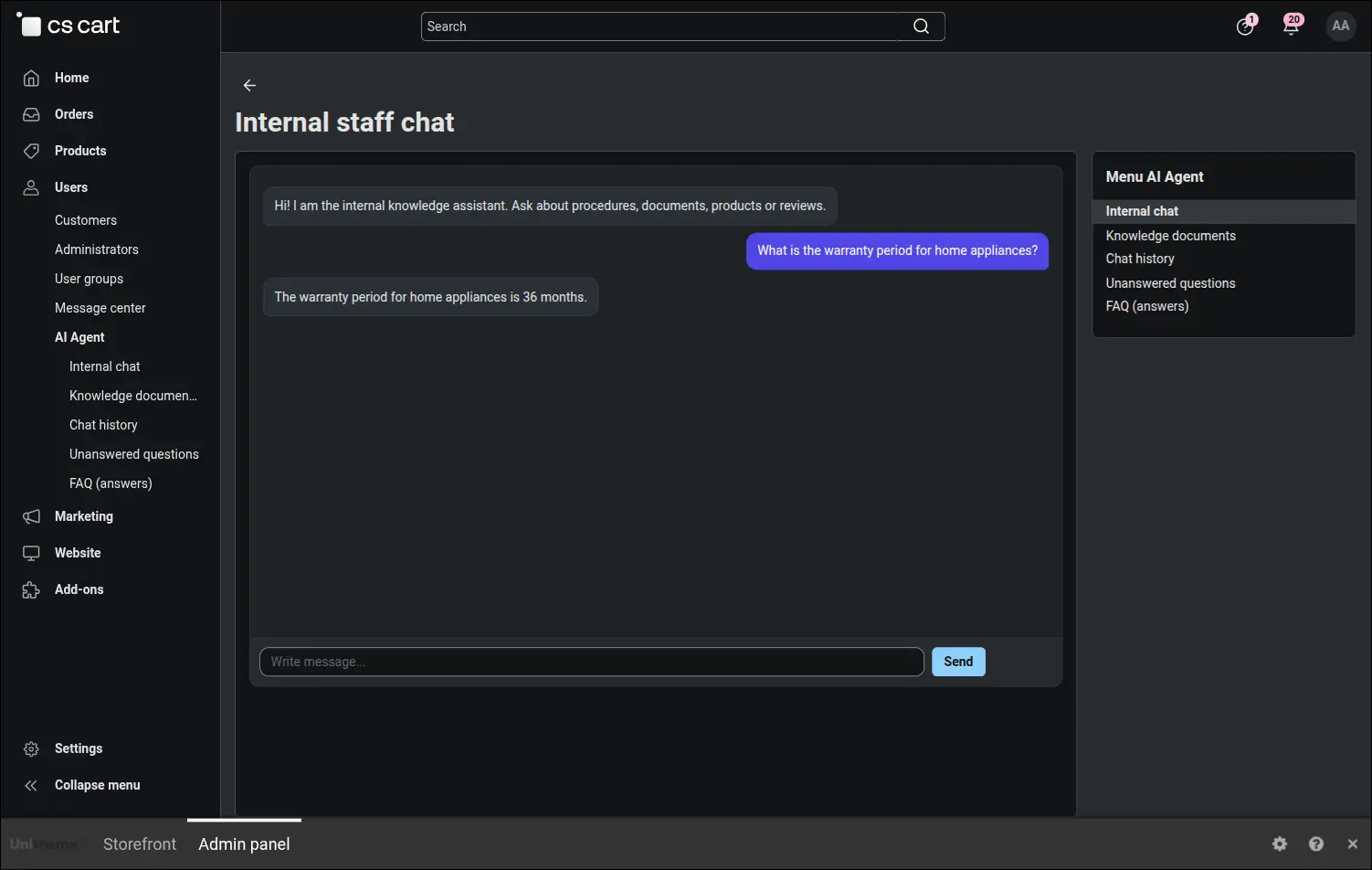
Internal chat for the team
A separate assistant for employees, isolated from the customer chat. It answers from internal knowledge, but only within the permissions of the person asking.
Two deployment models
The same assistant, two ways to run it. Choose based on where your data should live.
| Aspect | Hosted model | On-premise |
|---|---|---|
| Where your data lives | On our infrastructure and in OpenAI | Only on your company's own servers |
| Maintenance and updates | On our side | Your team, with our support |
| Language model | OpenAI, in the cloud | A local model on your hardware |
| Time to launch | Fast, with no infrastructure of your own | Depends on your infrastructure |
| Answer quality | Consistent, on OpenAI models | Scales with your hardware |
| Who it is for | A fast start, standard data | GDPR, confidential data, regulated sectors |
Security and GDPR
Designed so your company data stays under your control.
Your data stays under your control
In the on-premise variant everything stays on your servers. No data ever leaves your organisation.
GDPR compliant
You set how long conversations are kept. Older ones are deleted automatically after the chosen period.
Protection against content abuse
Uploaded content that would try to hijack the model is neutralised before it can reach an answer.
Authorised API
Communication between the parts of the system is cryptographically signed, with an optional IP allowlist.
No leaks between departments
Answers respect permissions, so one team's knowledge never reaches people without access.
A safe front end
Content returned by the model is sanitised, which protects the user's browser against XSS attacks.
Masking of personal data
Email addresses, card numbers and bank account numbers typed into the chat are masked when the conversation is saved. The history keeps just enough to recognise which one was meant.
Detection of attempts to hijack the chat
Questions trying to override the assistant's instructions or to extract them are caught and collected on a separate screen in the panel, so you can see who is probing your chat.
Pricing
Two deployment models. Choose based on where your data should live.
Hosted model
For companies that want to start right away, with no infrastructure of their own.
Setup · net
1,000 PLN / mo. · net
plus a fee for the language model tokens used
- Launch with no infrastructure of your own
- Maintenance, monitoring and updates on our side
- Knowledge base built from your documents and content
- Always up-to-date OpenAI models, no setup on your side
Infrastructure: n8n, Qdrant and OpenAI on our side
Choose this modelOn-premise
For organisations with confidentiality requirements that want to keep everything in-house.
Setup · net
250 PLN / hr. · net
support billed hourly, only when needed
- Language model and knowledge base on your own servers
- No data ever leaves the organisation
- Answer quality scales with your hardware
- A natural fit for GDPR and confidentiality requirements
Infrastructure: language model and knowledge base on the company's own servers
Choose this modelAll prices are net. The final scope of the deployment is agreed individually.
Frequently asked questions
Does our data go to OpenAI or another company?
In the hosted model, queries and knowledge fragments pass through OpenAI. In the on-premise model nothing leaves your servers, because we use a local model.
Where does the assistant get its answers from?
Only from the knowledge you upload: documents, pages and FAQs. It does not make things up and it points to the source of the answer.
Will employees see data they are not allowed to access?
No. Answers respect permissions and user groups, so everyone gets only what they are entitled to.
What happens when the assistant does not know something?
The question lands on a list of gaps in the panel, and similar wordings merge into one topic with a counter. From that list you write an article, helped by a draft the assistant prepares, and from then on the answer is part of the knowledge base. The finished page reminds you to review it whenever the material it describes changes.
How long does the deployment take?
We launch the hosted model quickly. The on-premise variant depends on your infrastructure, so we agree the scope individually.
Do we need our own servers?
Not in the hosted model. In the on-premise model yes, and answer quality then depends on the power of your hardware.
What languages does the assistant work in?
It converses in the languages supported by the model and replies in the one the customer writes in, including its regional variety. The add-on panel is translated into Polish, English, French, German, Spanish, Italian, Russian and Arabic.
How do we know the assistant pays for itself in the store?
The panel counts the conversations that ended in a purchase, together with the value of those orders. Only purchases made during the same visit as the conversation are included, and cancelled or declined orders drop out by themselves, so the figure errs on the low side rather than the high one.
What happens when the request package runs out?
The chat then replies with a message whose wording you set yourself, instead of calling the model. The usage screen shows consumption, a forecast for the end of the month and a daily chart, and an optional email warns you once a chosen threshold is crossed, before the allowance runs out.
Let's talk about your deployment
Book a live demo or send us a question. We reply quickly and to the point.
office@soft-solid.net · +48 661 661 964
SoftSolid · ul. Sportowa 14, 62-090 Rokietnica
NIP PL8421361047